Format
 Version 1.0.6
The format tab in the ribbon provides access to settings that control how values are displayed in the model. Parfera’s formatting options apply to the entire file.
-
Negatives: Choose whether negative values are displayed in red or black text using (1234.56) or -1234.56 notation.
-
Thousands separator: Toggle the use of thousands separators on and off.
-
Decimals: Set the number of decimal places displayed by unit type. The reset button returns all decimal settings to their default values.
Decimals exceptions
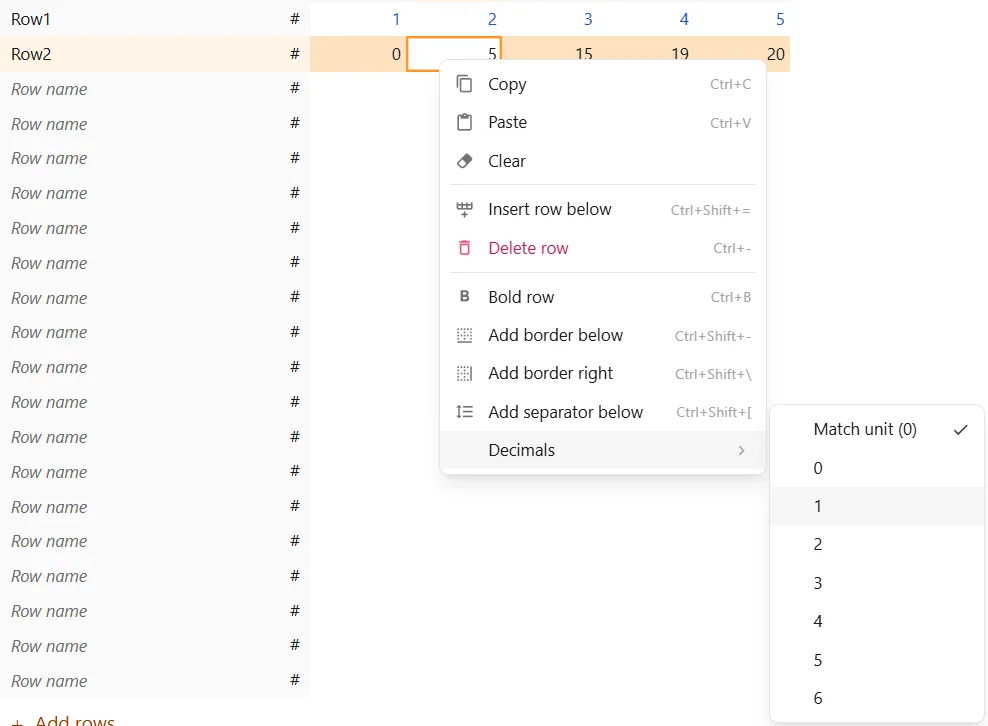
Section titled “Decimals exceptions”Decimals exceptions override the file-wide decimals settings for a specific row, variable, or output. Set an exception by right-clicking on a row and selecting the “Decimals” option.
 Version 1.1.8
Default decimals
Section titled “Default decimals”| Unit type | Default decimals |
|---|---|
| # | 2 |
| #K | 0 |
| #M | 1 |
| #B | 1 |
| % | 1 |
| $ USD | 2 |
| $K USD | 0 |
| $M USD | 1 |
| $B USD | 1 |
| $ CAD | 2 |
| $K CAD | 0 |
| $M CAD | 1 |
| $B CAD | 1 |
| € | 2 |
| €K | 0 |
| €M | 1 |
| €B | 1 |
| £ | 2 |
| £K | 0 |
| £M | 1 |
| £B | 1 |
| ¥ JPY | 2 |
| ¥K JPY | 0 |
| ¥M JPY | 1 |
| ¥B JPY | 1 |
| ¥T JPY | 1 |
| ¥ CNY | 2 |
| ¥K CNY | 0 |
| ¥M CNY | 1 |
| ¥B CNY | 1 |
| ¥T CNY | 1 |